Showing posts with label Microsoft Azure. Show all posts
Showing posts with label Microsoft Azure. Show all posts
30 December 2017
Azure Friday - Use the Azure portal to answer your billing questions
In this Friday Tommy Nguyen joins Scott Hanselman to discuss Billing in the Azure portal. If you're wondering: "Where do I find a copy of my invoice?" or "How does an Azure service affect my overall costs?" - these questions and more will be answered in this episode, which highlights features in the Azure portal to get cost and billing clarity.
Follow @AzureFriday

15 November 2017
Microsoft Certification Prep Sessions 2017
It is normal in
Microsoft Ignite to have Microsoft Certification Preparation Sessions
this year is no exception and there are available on the Microsoft Ignite official
Youtube channel.
Which includes the following sessions:
Microsoft Certification 101 - BRK1034 - https://youtu.be/xTCiGJyymZw
AZURE
70-532: Developing Azure Solutions - BRK3166 - https://youtu.be/LxAEHnTPFOQ
70-533: Implementing Azure Solutions - BRK3168 - https://youtu.be/dVVU4zQMv-s
70-534: Architecting Azure Solutions - BRK3170 - https://youtu.be/2orAXFfF4_0
BIG DATA
70-475: Big Data and Analytics Solutions - BRK3165 - https://youtu.be/vvm1a1PG988
70-773: Analyzing Big Data with Microsoft R | BRK3172 - https://youtu.be/UkzdU63ftUU
70-776: Engineering Data with Microsoft Cloud Services - BRK3173 - https://youtu.be/RH-MDvQiFio
WINDOWS 10
70-698: Installing and Configuring Windows 10 | BRK3163 - https://youtu.be/XVcmzfxpc-M
70-697: Configuring Windows Devices - BRK3171 - https://youtu.be/YNRMLNTwBVM
WINDOWS Server
70-740: Installation, Storage, and Compute with Windows Server 2016 - BRK3174 - https://youtu.be/L8zWO8rij4s
70-741: Networking with Windows Server 2016 - https://youtu.be/0CmTTLxbLmQ
70-742: Identity with Windows Server 2016 - BRK3176 - https://youtu.be/tABTHe24b_Q
70-744: Securing Windows Server 2016 - BRK3177 - https://youtu.be/kPRhFiuyvpY
PROGRAMING
70-357: Developing Mobile Apps - BRK3161 - https://youtu.be/dMM_jg4EcLk
70-483: Programming with C# - BRK3162 - https://youtu.be/xRiVMQy1qCU
OFFICE 365
70-346: Managing Office 365 Identities and Requirements - BRK3159 - https://youtu.be/-rrqqg9nHvQ
70-347: Enabling Office 365 Services - BRK3160 - https://youtu.be/n3pPRokc6_Y
DATA BASES
70-473: Cloud Data Platform Solutions - BRK3164 - https://youtu.be/YiQQKyUzSJQ
70-764: Administering a SQL Database Infrastructure - BRK3169 - https://youtu.be/XgyrsJWJSdY
Which includes the following sessions:
Microsoft Certification 101 - BRK1034 - https://youtu.be/xTCiGJyymZw
AZURE
70-532: Developing Azure Solutions - BRK3166 - https://youtu.be/LxAEHnTPFOQ
70-533: Implementing Azure Solutions - BRK3168 - https://youtu.be/dVVU4zQMv-s
70-534: Architecting Azure Solutions - BRK3170 - https://youtu.be/2orAXFfF4_0
BIG DATA
70-475: Big Data and Analytics Solutions - BRK3165 - https://youtu.be/vvm1a1PG988
70-773: Analyzing Big Data with Microsoft R | BRK3172 - https://youtu.be/UkzdU63ftUU
70-776: Engineering Data with Microsoft Cloud Services - BRK3173 - https://youtu.be/RH-MDvQiFio
WINDOWS 10
70-698: Installing and Configuring Windows 10 | BRK3163 - https://youtu.be/XVcmzfxpc-M
70-697: Configuring Windows Devices - BRK3171 - https://youtu.be/YNRMLNTwBVM
WINDOWS Server
70-740: Installation, Storage, and Compute with Windows Server 2016 - BRK3174 - https://youtu.be/L8zWO8rij4s
70-741: Networking with Windows Server 2016 - https://youtu.be/0CmTTLxbLmQ
70-742: Identity with Windows Server 2016 - BRK3176 - https://youtu.be/tABTHe24b_Q
70-744: Securing Windows Server 2016 - BRK3177 - https://youtu.be/kPRhFiuyvpY
PROGRAMING
70-357: Developing Mobile Apps - BRK3161 - https://youtu.be/dMM_jg4EcLk
70-483: Programming with C# - BRK3162 - https://youtu.be/xRiVMQy1qCU
OFFICE 365
70-346: Managing Office 365 Identities and Requirements - BRK3159 - https://youtu.be/-rrqqg9nHvQ
70-347: Enabling Office 365 Services - BRK3160 - https://youtu.be/n3pPRokc6_Y
DATA BASES
70-473: Cloud Data Platform Solutions - BRK3164 - https://youtu.be/YiQQKyUzSJQ
70-764: Administering a SQL Database Infrastructure - BRK3169 - https://youtu.be/XgyrsJWJSdY
2 July 2017
Azure Web App not found if a custom domain is used
When you add a custom domain to Azure by default, the domain name and the TLD extension are added. The "www" is considered a subdomain so it is when you access a webpage in Azure with www.domain.com it will be redirected to the error page 404 by defined as the following image.

I'll show you how you can add any subdomain to a Web App in Azure.
First you have to access the DNS management of the domain and create a CNAME (Alias) with the 'www' ID and point to the URI address of the Web App in Azure, for example.

Make sure the new setting has been accepted before you proceed with the Azure setup.
In Azure go to the Web App, select "Custom domains" and then select the "Add hostname".
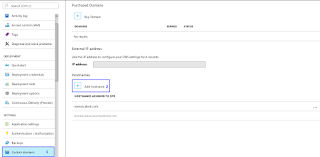
On the hostname enter the domain with the www subdomain then select the record type "CNAME (www.example.com or any subdomain)" and click the validate button.

If Azure can confirm to validate the "Domain owenership" the option "Add hostname" is active and you can continue with the process.

In the notifications you will receive the information that the new subdomain was added successfully.

You can now try accessing your web app with the www subdomain.

You can add any other subdomain to a Web App that is not required to be the "www". And that's how you add subdomain in Azure Web Apps.
There are Internet browsers like Firefox ESR that already do this compensation internally but not all browsers can do this. For example Firefox on Linux may be able to do the validation but on Windows not and is not an operating system problem. So it is always recommended in any cloud system or another set the www subdomain.

I'll show you how you can add any subdomain to a Web App in Azure.
First you have to access the DNS management of the domain and create a CNAME (Alias) with the 'www' ID and point to the URI address of the Web App in Azure, for example.

Make sure the new setting has been accepted before you proceed with the Azure setup.
In Azure go to the Web App, select "Custom domains" and then select the "Add hostname".

On the hostname enter the domain with the www subdomain then select the record type "CNAME (www.example.com or any subdomain)" and click the validate button.

If Azure can confirm to validate the "Domain owenership" the option "Add hostname" is active and you can continue with the process.

In the notifications you will receive the information that the new subdomain was added successfully.

You can now try accessing your web app with the www subdomain.

You can add any other subdomain to a Web App that is not required to be the "www". And that's how you add subdomain in Azure Web Apps.
There are Internet browsers like Firefox ESR that already do this compensation internally but not all browsers can do this. For example Firefox on Linux may be able to do the validation but on Windows not and is not an operating system problem. So it is always recommended in any cloud system or another set the www subdomain.
13 April 2017
Microsoft Azure Offer
Microsoft Azure are cloud services distributed worldwide and are increasingly being used.
Microsoft offers a number of programs with benefits for IT Pros, developers and more. On the blog is a page how you can try Azure I refer to the same programs.
O IT Pro Cloud Essentials changed the offer from 3 months to 12 months with a monthly value of € 25.

With your $25 monthly credit for 12 months, you can bank on a year of these career-building advantages:
They can register directly at https://account.windowsazure.com/signup?offer=MS-AZR-0024P using your Microsoft account.
What are the offers available? Are there more offers?
Yes. Azure has several offers and can be consulted the active and inactive offers in https://azure.microsoft.com/en-us/support/legal/offer-details/.
To associate the offer you must use the address https://account.windowsazure.com/signup?offer=[Offer number]
Pay-As-You-Go example: https://account.windowsazure.com/signup?offer=MS-AZR-0003P
Microsoft offers a number of programs with benefits for IT Pros, developers and more. On the blog is a page how you can try Azure I refer to the same programs.
O IT Pro Cloud Essentials changed the offer from 3 months to 12 months with a monthly value of € 25.

- Free use of cloud services such as Microsoft Compute and Storage
- Access to backend services for your mobile and web apps
- Tools and support for IoT, machine learning and analytics
How to register the offer
They can register directly at https://account.windowsazure.com/signup?offer=MS-AZR-0024P using your Microsoft account.
What are the offers available? Are there more offers?
Yes. Azure has several offers and can be consulted the active and inactive offers in https://azure.microsoft.com/en-us/support/legal/offer-details/.
To associate the offer you must use the address https://account.windowsazure.com/signup?offer=[Offer number]
Pay-As-You-Go example: https://account.windowsazure.com/signup?offer=MS-AZR-0003P